How to Fix Back Pain From Your Office Chair?

Time:2026-06-01 Author:Sienna
0%

Back pain is a common issue for many office workers. If you have ever wondered, "Why does my office chair cause back pain?" you are not alone. Dr. Sarah Kent, an ergonomic specialist, states, “The design of office chairs doesn't support the natural curve of the spine.” This lack of support can lead to muscle strain and discomfort.

Many office chairs are made with materials and designs that limit movement. Poor posture can worsen the situation. Sitting for extended periods creates pressure on the lower back. This often leads to stiffness and pain. Regular breaks and stretches can help mitigate these effects. However, the chair itself plays a significant role in back health.

Choosing the right chair is crucial. Look for one that offers lumbar support and encourages proper posture. Adjustability is essential to accommodate different body types. Remember, spending hours in a poorly designed chair may not be sustainable. Reflecting on your chair choice could be the key to overcoming back pain.
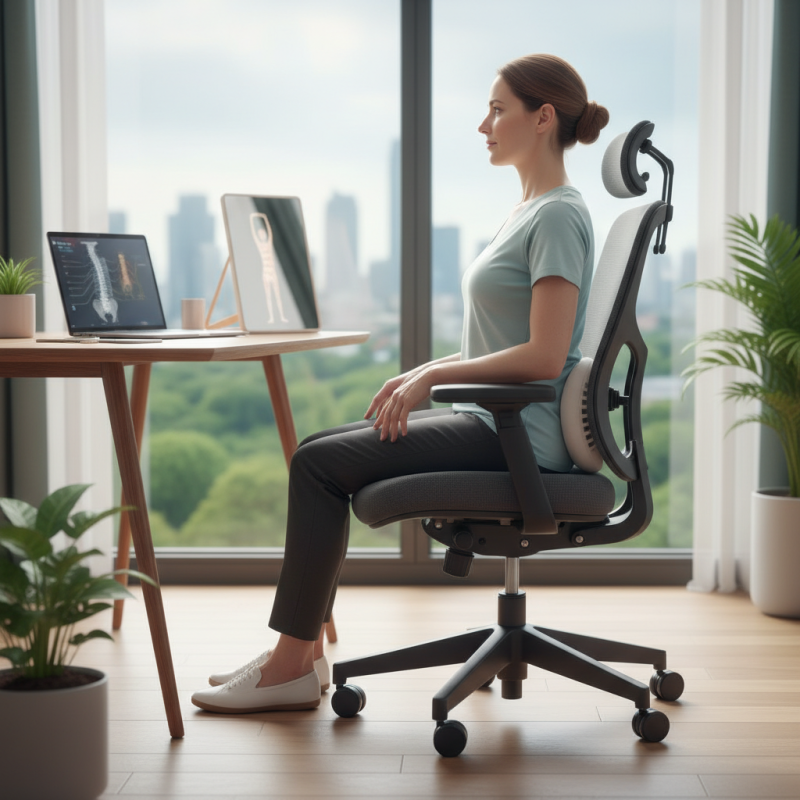
How to Fix Back Pain From Your Office Chair?

Identifying the Causes of Back Pain from Office Chairs

Back pain often stems from poor posture habits formed while sitting in an office chair. Many people slouch or lean forward, straining their backs. An improperly adjusted chair can exacerbate these issues. When the seat height or lumbar support is wrong, it disrupts natural spinal alignment. This misalignment may lead to muscle fatigue or injury over time.

Another key factor is the duration of sitting. Long hours without a break increase discomfort. It might seem manageable at first, but the body feels the effects of prolonged immobility. Regular movement, stretches, or even standing periodically can alleviate tension. Incorporating these practices into your daily routine can foster a healthier workspace.

Lastly, individual differences play a role in how one experiences back pain. What works for one person may not suit another. Different body types and health conditions necessitate tailored solutions. Identifying your own unique needs is essential. Reflect on your habits and chair setup to find what best alleviates discomfort.

Back Pain Causes Related to Office Chairs

Assessing Your Current Office Chair for Ergonomic Support

When evaluating your office chair for ergonomic support, consider its height and lumbar support. An adjustable height allows your feet to rest flat on the floor. If your chair is too high or low, it can strain your back. A chair with good lumbar support promotes a natural curve in your spine. This helps reduce pressure on your lower back.

Next, examine the chair's seat depth. If the seat is too deep, it may hinder circulation in your legs. Ideally, there should be a gap between the back of your knees and the edge of the seat. Evaluate the armrests as well. They should support your arms without causing shoulder strain. Sometimes, office chairs lack adequate customization, leading to discomfort.

Don’t forget to check the materials. Breathable fabrics can help you stay comfortable throughout the day. A cushion that’s too soft might not provide necessary support. Reflection is key here; if you find yourself constantly adjusting or shifting, your chair might not be the right fit. Ergonomic design varies from person to person. Assessing your specific needs is crucial. Your comfort directly impacts your productivity.

Implementing Correct Posture While Sitting at Your Desk

Sitting for long hours in an office chair can lead to serious back pain. One effective way to alleviate discomfort is by implementing correct posture while you work. A small adjustment can significantly improve your experience.

Make sure your feet are flat on the floor. This simple change provides better support and helps your spine align properly. Your knees should be at hip level. If your chair doesn’t allow this, consider using a footrest.

Additionally, keep your back straight and shoulders relaxed. Avoid slouching or leaning forward. Position your computer screen at eye level to prevent straining your neck. This helps maintain a neutral spine.

Here are some quick tips: Take regular breaks. Stand up, stretch, or walk around every hour. Use a lumbar support pillow if your chair lacks back support. Hydration is equally important. Drink water throughout the day to keep your body functioning well.

Small changes can lead to a significant improvement in your overall well-being. Monitor your posture and make conscious corrections throughout your workday.

How to Fix Back Pain From Your Office Chair? - Implementing Correct Posture While Sitting at Your Desk

Posture Type Description Common Issues Corrective Actions
Neutral Posture Back straight, shoulders relaxed, feet flat. Minimal strain on muscles. Maintain regular breaks, adjust chair height.
Slouched Posture Hunched back, rounded shoulders. Increased back pain and fatigue. Sit upright, use lumbar support.
Forward Leaning Posture Leaning forward, head jutting forward. Strain on neck and lower back. Adjust monitor height, sit back in chair.
Crossed Legs Legs crossed while seated. Uneven pressure on lower back. Keep feet flat or use a footrest.

Incorporating Regular Breaks and Stretching into Your Routine

Sitting for long hours in an office chair can cause significant back pain. One effective way to combat this discomfort is to incorporate regular breaks and stretching into your daily routine. Aim to stand up and move at least once every hour. This simple act can reduce stiffness and keep your muscles engaged. Even a brief walk around the office or some gentle stretches can make a difference.

Stretching is vital for any office worker. It’s easy to forget when you’re busy. Set reminders on your phone or calendar to encourage yourself. Simple stretches like neck rolls, shoulder shrugs, and spinal twists can alleviate tension. Spending just a few minutes on these exercises can improve your flexibility and alleviate pain. However, it’s important to listen to your body. Pushing too hard can lead to injury.

Incorporating these habits requires discipline. You might not always feel motivated to break away from work. Recognizing this challenge is the first step. Finding a stretching buddy can help keep you accountable. Sharing these moments can also make stretching more enjoyable. You’ll likely feel the benefits both physically and mentally.

Choosing the Right Accessories to Enhance Comfort and Support

Finding the right accessories can drastically improve comfort in your office chair, reducing back pain. A study from the American Chiropractic Association reveals that about 31 million Americans experience lower back pain at any given time. Ergonomics is key.

Consider a lumbar support cushion. It helps maintain proper spinal alignment. This can reduce strain on your back. A recent ergonomic report suggests that proper lumbar support can decrease discomfort by up to 40%. Achieving the right position is essential. Use a seat cushion to elevate your hips. This changes the angle of your pelvis, relieving pressure.

Here’s a tip: Adjust your chair height so your feet rest flat on the ground. Your knees should be at a 90-degree angle. Additionally, a footrest can enhance your posture, offering support where it’s needed most. Test different accessories to find what works best for you. This process may reveal that not every choice feels comfortable right away. It’s okay to explore. Finding your perfect setup is a journey.

FAQS

: What causes back pain from office chairs?

: Poor posture and an improperly adjusted chair lead to back pain.

How does chair height affect back pain?

Incorrect chair height can strain your back. Feet should rest flat on the floor for support.

What role does lumbar support play?

Good lumbar support promotes a natural spine curve and reduces lower back pressure.

How does sitting duration affect discomfort?

Long sitting hours increase discomfort. Regular movement or stretching helps alleviate tension.

Why are individual needs important for office chairs?

Different body types require tailored solutions. What works for one person may not suit another.

What should I check for in seat depth?

An ideal seat depth allows a gap behind your knees for circulation.

How can I improve my posture while sitting?

Keep feet flat on the floor, back straight, and avoid slouching.

What's a quick tip for reducing back pain?

Take breaks every hour to stand, stretch, or walk around.

How can materials affect comfort in an office chair?

Breathable fabrics keep you comfortable. Soft cushions might not provide necessary support.

Why is reflection on chair setup important?

If you're constantly adjusting, your chair may not be right for you. Assessing needs is crucial.

Conclusion

Back pain from office chairs is a common issue that many face while working long hours. Understanding why your office chair causes back pain is crucial for finding solutions. The first step is identifying the underlying causes, which may include poor chair design or lack of ergonomic support. Assessing your current chair for features such as lumbar support and seat height can help determine its suitability for your needs.

Implementing correct posture while sitting at your desk is essential to alleviate discomfort. Regular breaks and stretching exercises can also significantly reduce the strain on your back. Additionally, choosing the right accessories, such as cushions or footrests, can enhance your overall comfort and support. By addressing these key areas, you can create a more ergonomic workspace that minimizes the risk of back pain.

Sienna

Sienna

Sienna is a skilled marketing professional with a deep expertise in our company’s core products and services. With a passion for innovation and detail, she plays a pivotal role in crafting insightful blog posts that not only highlight the unique features of our offerings but also provide valuable......